
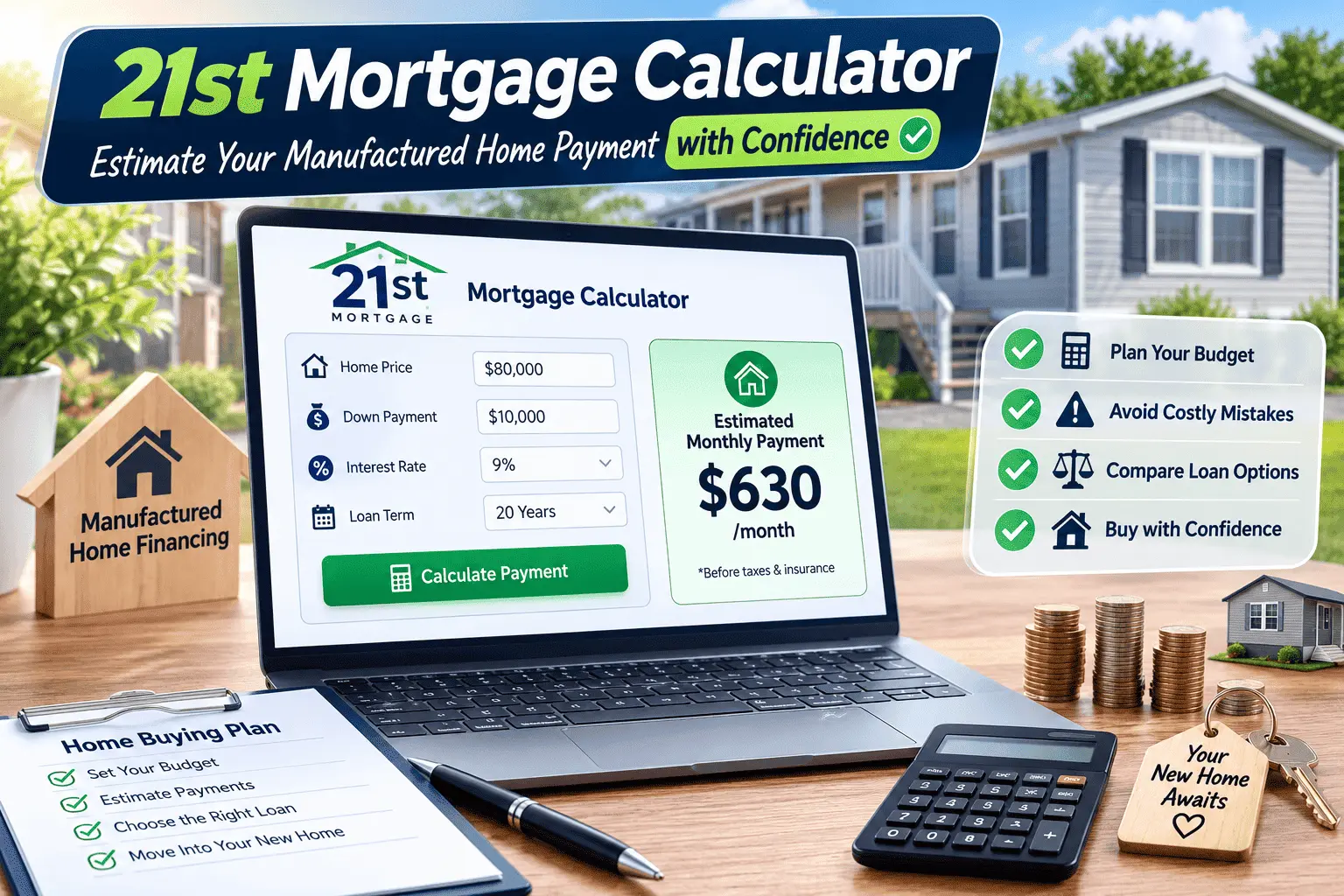
21st Mortgage Calculator: Discover Your True Home Payment Before You Apply
Table of Contents
You found a manufactured home you like, and now you need real numbers before you call a lender. Punching numbers into a regular mortgage calculator feels risky when the tool was not even built for manufactured housing. Maybe you already tried one and got a payment figure that felt way off from what other buyers were talking about online. That mix-up happens a lot, because most calculators online are built around traditional site-built homes, not chattel loans or manufactured housing terms. The 21st Mortgage Calculator is different, since it was built only for this type of financing. This confusion costs buyers real time, especially when a housing deal is moving fast and everyone is waiting on a number.
This guide walks you through exactly how the 21st Mortgage Calculator works, what numbers to enter, and how to read your results the right way. After helping several manufactured home buyers run these numbers, one thing stands out: small input mistakes lead to big payment surprises. By the end of this article, you will know how to run your own estimate, avoid the common mistakes, and understand why your final loan offer might land differently than your first calculation. We will also walk through two real number examples together, so the process feels less abstract and more like something you can actually do yourself.
What Is the 21st Mortgage Calculator
The 21st Mortgage Calculator is an online tool from 21st Mortgage Corporation. It helps you estimate your monthly payment before you apply for a loan. You enter basic numbers like home price, down payment, and loan term. The tool then gives you a rough monthly payment figure to work with.
21st Mortgage only finances manufactured and mobile homes. That focus is different from a regular bank calculator, which is built around standard site-built houses. Because of this, the tool factors in details unique to manufactured housing, such as chattel loan terms and shorter repayment periods. You can read our full breakdown of the lender in this 21st Mortgage review if you want more background before you start running numbers.
Manufactured home financing works differently from a typical home loan, and the calculator reflects that. Loan terms are often shorter, and interest rates follow their own range. Understanding these differences early helps you avoid confusion once you compare offers from other lenders. It also helps you spot when a random online calculator is giving you numbers that do not apply to your situation. Because the tool is free and does not require an account, you can run as many test scenarios as you want.
21st Mortgage has been financing manufactured and mobile homes since 1995, based out of Knoxville, Tennessee. That long track record is part of why the company built calculators specific to this niche instead of relying on generic mortgage software. Knowing this background can give you more confidence in the numbers the tool produces.
Types of 21st Mortgage Calculators
21st Mortgage does not offer just one tool. There are four separate calculators, and each one answers a different question about your loan.
Each calculator lives on the 21st Mortgage website and works without creating an account. You can switch between them freely while you plan your purchase. Trying more than one tool during your research gives you a fuller picture than relying on a single number.
- Payment Estimator – gives a quick monthly payment number based on home price and loan terms
- Amortization Calculator – breaks down how each payment splits between principal and interest
- Extra Principal Calculator – shows how extra payments shorten your loan and save interest
- Affordability Calculator – helps you figure out how much home actually fits your budget
Payment Estimator
This is the tool most buyers start with. You plug in the home price, down payment, interest rate, and loan term. It gives you an estimated monthly payment within a few seconds. Most first-time manufactured home buyers use this one first because it needs the fewest inputs.
Amortization Calculator
This tool goes deeper than a simple payment number. It shows a full schedule for every payment across the life of the loan. You can see exactly how much of each payment goes to interest and how much lowers your balance. Reviewing this schedule before you sign helps you understand exactly how much interest you will pay over time.
Extra Principal Calculator
If you plan to pay extra toward your loan, this tool shows what that extra money actually does. Enter an extra monthly or one-time amount, and it recalculates your new payoff date. It also shows how much interest you would save over the life of the loan. Even a small extra payment each month can shave months, sometimes years, off your loan term.
Affordability Calculator
Not sure how much home you can actually afford? This tool flips the math around. You enter your income and monthly expenses, and it estimates a comfortable price range for your new home. This tool is especially useful if you are still deciding between a new home and a used one.
Information You Need Before Using the Calculator
Before you open the 21st Mortgage Calculator, gather a few numbers first. Having these ready makes your estimate far more accurate and saves you from guessing halfway through.
- Estimated home price or purchase amount
- Planned down payment amount
- Loan term, usually 15, 20, or 23 years for manufactured homes
- Estimated interest rate based on your credit profile
- Property taxes and homeowner’s insurance costs in your area
- Whether the home sits on owned land or inside a rented community
Gathering these numbers ahead of time takes only a few minutes, but it changes how useful your results are. A guess for your down payment or interest rate can throw your estimate off by a lot. If you are not sure about your interest rate yet, use a slightly higher number so your estimate leans safe rather than optimistic.
It also helps to know whether you are buying new or used, since some loan terms differ between the two. Knowing your target moving-in date matters as well, because timing can affect which rate lock options are available to you.
How to Use the 21st Mortgage Calculator (Step-by-Step Example)
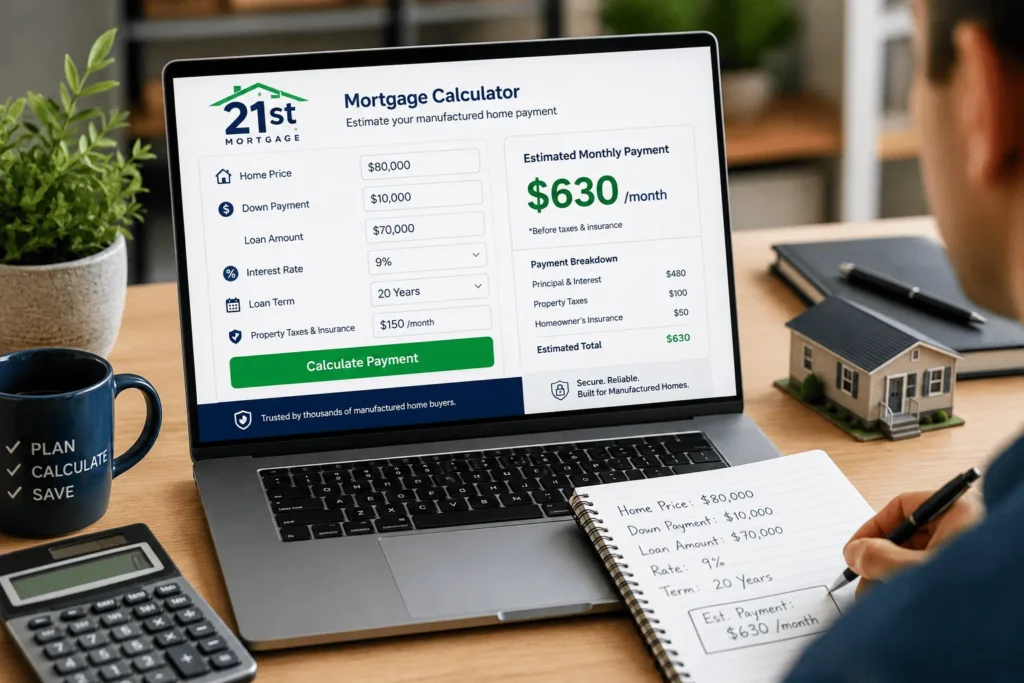
Let’s walk through a real example together. Say you are buying a manufactured home for $80,000. You plan to put down $10,000, which leaves a loan amount of $70,000.
Here is how the process looks in practice:
- Open the Payment Estimator on the 21st Mortgage site
- Enter the home price ($80,000) and your down payment ($10,000)
- Choose your estimated interest rate, using 9% for this example
- Select your loan term, in this case 20 years
- Add property taxes and insurance if you already know these numbers
- Review your estimated monthly payment on screen
With these numbers, your estimated payment lands somewhere around $630 a month, before taxes and insurance are added in. Your real number will shift slightly once 21st Mortgage quotes your actual rate. If your result does not match what you expected, it helps to double-check every field before assuming the tool is wrong. You can also send your loan details to james@allthings-mortgage.com if you want a second set of eyes on your numbers.
Now let’s try a second scenario for comparison. Say you choose a used manufactured home priced at $50,000, put down $5,000, and pick a 15-year term at 10% interest. Running these numbers through the same steps gives you a different monthly payment, usually higher per month but with less total interest paid over time. Comparing a few scenarios side by side like this is the fastest way to understand how each input actually moves your payment.
Chattel Loan vs. Real Property Loan: How It Changes Your Calculator Estimate
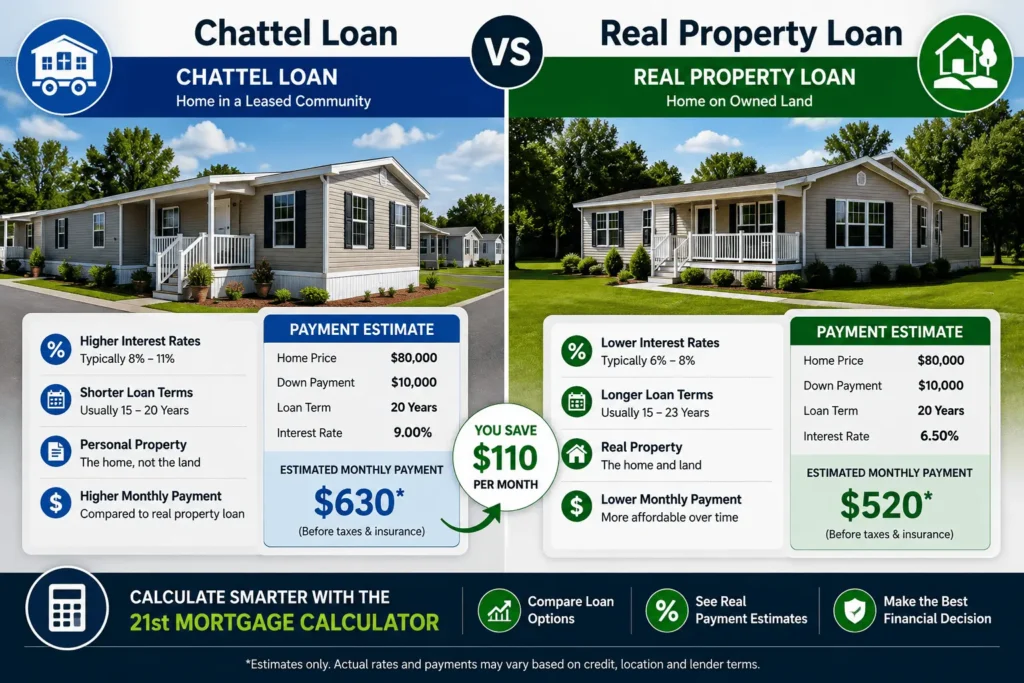
Your loan type changes your numbers more than most buyers expect going in. 21st Mortgage offers two different paths: chattel loans and real property loans.
A chattel loan treats the home like personal property, similar to how a car loan works. This applies when the home sits on land you do not own, like inside a manufactured home community. Rates on chattel loans usually run higher, often somewhere between 7% and 14%.
A real property loan applies when the home is permanently attached to land you actually own. This loan type often qualifies for lower rates, closer to a standard mortgage rate. When you run the 21st Mortgage Calculator, always pick the loan type that matches your real situation, since it directly changes your rate and your monthly payment.
Most buyers do not choose their loan type on their own. The land situation usually decides it for you. If you already own the land and plan to place the home permanently, ask about a real property loan first, since it often comes with a better rate.
Some buyers qualify for either option depending on their land situation and how the home is set up. If you are unsure which category your purchase falls into, ask your dealer or loan officer directly before running your estimate. It is worth asking this question early, before you fall in love with a specific home, since the answer can change your realistic budget range by a noticeable amount. A quick phone call to the seller or community office is usually enough to find out.
How This Tool Compares to a Standard Mortgage Calculator
A regular online mortgage calculator assumes you are financing a site-built home with a 30-year term. That assumption does not match manufactured housing at all. Loan terms for manufactured homes are usually shorter, often capping around 23 years instead of 30. Interest rate ranges also run higher, since chattel loans are considered higher risk than a standard mortgage.
Property tax and insurance inputs can behave differently too, especially if your home sits in a community with a lot rent. A generic calculator has no field for lot rent, which throws off your real monthly cost. This is the main reason a lender-specific tool for manufactured housing gives you a more honest number than a general-purpose site.
Voice search and quick online searches often return generic mortgage calculators first, since they get more overall traffic. That does not mean they are the right fit for a manufactured home purchase. Sticking with a calculator built for this loan type keeps your numbers grounded in reality instead of a best-case guess built for a completely different kind of home.
21st Mortgage Interest Rates and How They Affect Your Payment
Interest rate is the single biggest factor in your monthly payment. Even a one-point difference can change your bill by $40 or more each month.
21st Mortgage rates typically range from 7% to 14%, depending on your credit score, loan type, and down payment size. Buyers with strong credit and a real property loan usually land on the lower end of that range. Buyers with a lower credit score or a chattel loan on rented land usually end up closer to the higher end.
Your credit score is only part of the equation, though it carries the most weight. The size of your down payment and whether your loan is chattel or real property also shift where you land in that range. Two buyers with the same credit score can end up with different rates simply because of these other factors.
Testing a few different rates in the calculator gives you a realistic budget range instead of one fixed number. This matters because your actual quoted rate will not be known until you submit a full application. Your rate is not something you can negotiate the way you might with a car purchase, since it comes from a mix of your credit score, loan type, and current market conditions. Shopping around and comparing offers from more than one lender is still worth doing, even within the manufactured home space.
Eligibility Requirements That Affect Your Estimate
Your calculator estimate is only as accurate as the eligibility numbers sitting behind it. Three factors matter the most here. These three areas work together as a system rather than separate checkboxes. A lender looks at the full picture, not just one number in isolation, before deciding your final terms.
Credit Score Requirements
21st Mortgage does not set a strict minimum credit score for most loans. But a lower score usually means a higher rate and a larger down payment. Buyers with scores below 575 often need a down payment of 35% or more to qualify. A slightly better score, even a jump of twenty or thirty points, can sometimes lower your rate enough to notice in your monthly bill.
Down Payment Requirements
Well-qualified buyers may get approved with zero down. Most other buyers put down somewhere between 5% and 35%, depending on credit and loan type. A bigger down payment lowers both your loan amount and your monthly payment. Saving a bit more before you apply is one of the simplest ways to lower your estimated payment.
Minimum Loan Amount
If you buy from a dealer or an existing 21st Mortgage customer, the minimum loan amount is $16,000. For other purchases or refinances, that minimum climbs to $25,000. This minimum exists because very small loans are not cost effective for the lender to originate. Keep this number in mind before you test very small loan amounts in the calculator, since anything below it will not reflect a real loan. If you are unsure which eligibility tier applies to your situation, calling the number listed on our 21st Mortgage phone number guide usually clears it up fast.
How to Read Your Amortization Schedule
Once you run the Amortization Calculator, you get a full table of payments. Each row on that table represents one month of your loan.
Early payments put more money toward interest. Later payments shift more of your money toward the actual loan balance. This pattern is normal for almost every mortgage or chattel loan, not just something specific to 21st Mortgage.
For example, on a $70,000 loan at 9% interest, your very first payment might send close to $500 toward interest and only around $130 toward your balance. By year ten, that split looks very different, with most of your payment finally reducing the loan itself. Seeing this laid out month by month is often the moment buyers really understand how interest works over the life of a loan. This is also why paying even a little extra early in the loan tends to save more interest than the same extra payment made later.
If you plan to check this schedule often, it helps to already have your account set up ahead of time. Our guide on the 21st Mortgage login process walks through account access step by step.
Why Your Estimate May Differ From Your Final Loan Offer
A calculator estimate is a starting point, not a guarantee. Several things can shift your number once you actually apply for the loan.
Your final rate depends on your real credit report, not the estimate you typed into a form. Property taxes and insurance quotes can also come in higher or lower than your first guess. An appraisal on the home itself may adjust your final loan amount too, especially on older manufactured homes.
Lenders also ask for documents that confirm the numbers you typed into the calculator. Pay stubs, tax returns, and bank statements all get compared against what you entered. Any mismatch between your estimate and your real paperwork can shift your final offer. Keeping these documents ready ahead of time, even before you start shopping for a home, can shorten the whole process by days.
If your final offer looks very different from your original calculator estimate, it is worth asking your loan officer why. You can also send your paperwork to james@allthings-mortgage.com if you want an outside opinion before signing anything. Once your loan actually closes, you will want to understand your monthly payment options so nothing catches you off guard later.
What Happens After You Get Your Calculator Estimate
Getting a number from the calculator is just the first step. Most buyers move next into a real application, where 21st Mortgage checks your income, credit, and the specific home you want to buy.
A loan officer will usually ask for pay stubs, bank statements, and details about the home or land. This process typically takes longer than the instant calculator result, often a few weeks depending on how quickly documents come in. Being organized before you apply speeds things up a lot.
Once approved, you will get a real quote that replaces your calculator estimate completely. This quote reflects your actual credit report and the true cost of the home, not the rough numbers you typed in earlier. From there, you can compare it against your original estimate to see how close you landed.
Tips to Get a More Accurate Estimate
A few small habits make your numbers more reliable. Round your interest rate up slightly instead of down, since actual quotes rarely come in lower than expected. Enter a realistic number for property taxes instead of leaving that field blank. Run the numbers more than once as your credit score, savings, or home choice changes.
It also helps to revisit your estimate a few weeks before you apply. Rates shift, and your credit profile can change too. Checking your numbers again right before submitting an application keeps your expectations lined up with reality.
Keep a simple record of each estimate you run, especially the inputs you used. This makes it easy to compare offers later without redoing your math from scratch. It also gives you talking points when you speak with a loan officer about your options. Over time, this habit turns into a useful record you can lean on for future refinancing decisions as well.
Pros and Cons of 21st Mortgage
Weighing these points together helps you decide if 21st Mortgage fits your situation before you commit time to a full application.
| Pros | Cons |
|---|---|
| No down payment option for well-qualified buyers | Rates run higher than typical site-built home mortgages |
| No strict minimum credit score requirement | Not available in Alaska, Hawaii, Massachusetts, or Rhode Island |
| Specializes specifically in manufactured and mobile homes | Lower credit scores can mean much larger down payments |
| Offers four free planning calculators | Chattel loans often carry higher rates than real property loans |
None of these points should scare you off if manufactured housing is the right fit for your budget and lifestyle. Every lender in this space carries some version of these same trade-offs, since manufactured home financing is inherently different from a standard mortgage. What matters most is comparing your real numbers, not just a general reputation online.
Conclusion
Running the numbers before you apply saves you from surprises later, and that was the whole point of this guide from start to finish. You now know how the 21st Mortgage Calculator works, what information to gather first, and why your final offer might land differently than your first estimate. Use the payment estimator early, compare a couple of scenarios, but always treat the number as a planning tool rather than a locked-in rate. With these steps in hand, you can walk into your loan application with realistic expectations, fewer surprises, and far more confidence in the numbers you are working with.
Frequently Asked Questions
Does using the 21st Mortgage Calculator affect my credit score?
No. Running numbers through the calculator does not pull your credit report. It only uses the numbers you type in yourself. Your credit only gets checked once you submit a real loan application, so you can test as many scenarios as you like without any risk.
Is the calculator estimate a guaranteed rate?
No, it is only a planning estimate. Your final rate depends on your credit report, down payment, and the specific home you are buying. Always treat the calculator number as a starting point, not a locked-in offer, and expect some movement once you formally apply.
Can I use the calculator for a used manufactured home?
Yes, the tool works for both new and used manufactured or mobile homes. Just enter the correct purchase price and select the right loan type for the home you are considering, since older homes sometimes carry different terms.
Which states is 21st Mortgage available in?
21st Mortgage lends in every state except Alaska, Hawaii, Massachusetts, and Rhode Island. Coverage can shift over time, so it helps to confirm availability for your state before you apply, especially if you are relocating.
What loan term should I choose in the calculator?
Most manufactured home loans run between 15 and 23 years. A shorter term means a higher monthly payment but less total interest paid. Try a few different terms in the calculator so you can compare your real options side by side before deciding.